• Hello MLAers! We've re-enabled auto-approval for accounts. If you are still waiting on account approval, please check this thread for more information.

8600 Resurrection (same display problems as my G3 adventure)

Topic pretty much explains it all.  I have an 8600/250 I am trying to get up and running in my quest for the towers of power.  I get boot chime, everything seems to spin up, there is a switch on display as if it got a signal saying 'prepare for input!' and then it goes back to sleep mode.

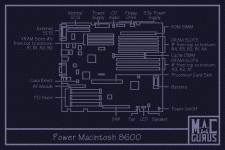
Question number 1: Where is the CUDA reset button on these? I tried looking in a similar place as the Gossamer board but no luck.  I guess my eyes just are not good enough, sadly.

Thanks guys!

 
Pull the processor card, the switch may be hidden below the sink. But pull it anyway to reseat it. Also make sure the PRAM battery is fresh. I dont recall if these are sensitive to a good one or not, but its always good to rule that out.

And what display are you using?

 
I found it, thanks! 

I have reset it (unplug, hold down for 20 seconds), reseated the CPU card firmly and then zapped PRAM.

I am using an HP 2011x which I have working perfectly with my G3MT.  I am using the exact graphics card from the G3.  The machine boot chimes, and then the clock is not set beep after it gets to the desktop but screen remains dark.  I am base config, 2x 64MB RAM chips, power, VGA, ADB mouse/keyboard.

I am using the same battery that I have in the G3. it was a pull from a Quicksilver for testing to get the G3 up and running.

I am not sure what other troubleshooting steps to take as the PRAM/CUDA reset accomplished nothing.  I went through this with the G3 using every PCI video card I could think of.  It was not until I put in the Radeon 9200 that I was able to get output to the display with that machine but even that was not enough to pull an output from the 8600.

 
Also, if someone could verify... How sensitive are the 8600 and 9600 series to PRAM battery issues?  I will be ordering a few but until they get here I would still like to make progress (making progress is how the SO is willing to let me have three antique beige towers in the breakfast nook while I work on them).

Thanks again everyone.  I do not remember resolving problems this frustrating back in 97-98 but back then everything was mostly new I suppose.

 
Usually if a display does not come on like you say, the refresh rate is out of bounds. Do you have some VRAM installed on the motherboard? Even with a card, it needs some.

If you get a chime you normally dont need a PRAM battery.

 
Pretty sure that is for a ROM, but the ROMs should be onboard. And the fact that you get a chime means they are.

 
Awesome, thank you!

So now I have no clue on what to do from here.  I have used a known working video card, cable, display.  two of the four VRAM sockets are populated. I have boot chime and it gets to OS desktop (based on incorrect time/date beep), I have minimal configuration otherwise.

 
Try another display. While that card and display combo may work in the G3, it may not work on the 8600. Different architecture and ROMs.

Also try turning it on without display hooked up, then attach once booted. Just for giggles.

 
The 9600 is somewhat finicky about batteries, yes. Try turning the machine on, then off then on again at powerup over a space of about 3 seconds... its a trick to get a 9600 with a flat PRAM battery going. Or in my case, no PRAM batery. That said, this only partially solve d my issue. I still have two cards that exhibit this exact problem yet work in other stuff fine.

 
As I recently re-discovered, ensure there is not a DB-15 to DE-15 (Mac to VGA) adapter attached to the logic board monitor port. Oops! Also, it may be worth pulling all other PCI cards (if any) and trying the graphics card in different slots. Standing on one foot with your tongue out and one hand on your head while pressing the power key occasionally works, too.

 
Last edited by a moderator:
Thanks for the tip.  I actually have no adapters or anything else on the logicboard video out.  I will try reseating everything again and for giggles switching PCI slots and see if that changes anything.

Thank you everyone for sticking with me on this journey of resurrection! 

 
Back
Top