

Follow along with the video below to see how to install our site as a web app on your home screen.
Note: This feature may not be available in some browsers.
Hello MLAers! We've re-enabled auto-approval for accounts. If you are still waiting on account approval, please check this thread for more information.
Ok so I have an orange micro card and the fan was unplugged when I got it.
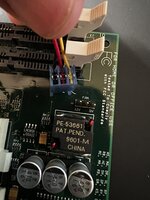
The board is nicely labeled 12 and 5v however the wire colors on the fan just don’t seem to match up. Am I missing something? Could it be an unoriginal fan?

Ground - Black
12V - Red
Tach/Sense (RPM readout signal for monitoring) - Yellow
The fan is using a standard PC CPU fan header. The card? Well I have no clue what it is laid out for. I would probe the pins for voltage. Looking at photos of other OrangePCi cards, they leave the sense pin hanging, and just have the 12V and Ground plugged in. So reverse the orientation so the black wire is plugged into the middle pin and the red wire is on the 12v pin. Yellow wire hangs out doing nothing.
Looks like OrangeMicro did this for flexibility in fan suppliers. Some of their boards have 5v fans on them.
Use a pin to pop out the pins from the fans plug. Put black in the middle, align red with 12v and leave yellow unplugged. Wrap yellow in some heatshrink to stop it shorting, or cut it off once you're happy.
This site uses cookies to help personalise content, tailor your experience and to keep you logged in if you register.
By continuing to use this site, you are consenting to our use of cookies.
