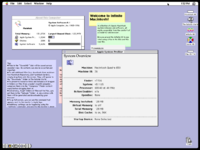
Yeah, I disabled appearance manager entirely and had to move stuff over from 7.6.1 to make sure everything worked. This is still Mac OS 8.1, just without platinum.
I managed to pull it off too, installing the older version of the appearence manager, disabling platinum option and using the System 7.6.1 Finder. However, using the 7.6.1 Finder prevents you from doing anything during a file operation.
I’d like to try this on a Beige G3 as I’ve never seen one run with Platinum turned off (edit: actually, I lied - Disk Tools runs without Platinum). Also, I bet it’s possible to hack the 8.1 Finder to disable its check for Appearance Manager.
perhaps its possible to modify the 8.1 finder. and yes, the downgrade is apparent with the 7.6.1 finder and not being able to do anything during a file operation. i think it would be nice if the 8.0/8.1 finder can be patched.
This site uses cookies to help personalise content, tailor your experience and to keep you logged in if you register.
By continuing to use this site, you are consenting to our use of cookies.