• Hello MLAers! We've re-enabled auto-approval for accounts. If you are still waiting on account approval, please check this thread for more information.

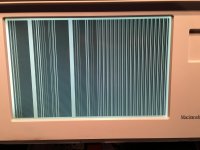
Lines on the screen of my Macintosh Portable, please help!

Jujul98

6502
Hi,

I have found this beautiful Macintosh Portable (backlit, M5126).

Unfortunately it wont boot... I don't think the screen panel is broken, the location of the lines is not the same at each startup.

I have the same problem when I remove batteries.

What should I do? (Capacitors?)

Sorry for my bad english...
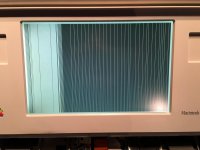
image.jpeg

image.jpeg

 
Does it bong? If it does, it kinda looks like it could be either a VRAM or cable problem. If no bong, probably something else, most likely cap related.

Regardless, recapping it definitely wouldn't hurt, and should be done ASAP to hopefully prevent further degredation of its condition.

Worst case, perhaps you could send it to techknigh for diagnosis and repairt, as he is our resident Portable expert.

c

 
I second the technight post, also if your using a newer powerbook power supply "STOP!!!!"  it will burn up the motherboard.

 
I wouldn't keep powering it up until the wash and recap like Techknight said... You can zap other components!!

 
Thanks for your answers.

It doesn't bong and I am using the original power supply !

My father is going to wash the motherboatd recap it (he is good with solder, he saved my SE/30!!)

Do I have to replace the big main battery or only the small backup battery? (Or both?)

 
Main battery, backup battery is useless, but it will need removed. 

I would use one of those 6v security light rechargeable battery to replace the main battery with.

 
Last edited by a moderator:
If have this same issue with my Mac Portable 5120 (non backlight)

I will bath it with isopropyl alcohol and then recap it . And probable buy a new battery .

I haven’t recapped a Mac Portable before . Wish me luck guys …
 
Back
Top