

According to this page http://myoldmac.net/FAQ/SADerror-earlymac.htm
It's a memory problem on the G10 ship location...
It's a memory problem on the G10 ship location...



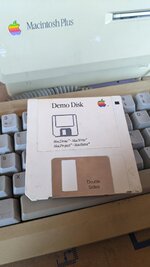
That's normal when booting from a floppy. You would need to boot from a SCSI drive for better speed.It is extremely slow though!
The question is: how to use another disk than the system disk?
Drag the floppy icon to the Trash icon.How to eject the disk?
Depends on the disk you are using. I assume your system disk doesn't have them. That demo disk doesn't look like it includes a bootable System.Mac Draw and Mac Write are not part of the system floppy ?
You swap disks or get an external 800K floppy drive. It's very time consuming and tiring, and very slow, as the Mac will require several disks swaps each time you save or read a file.Other question: How to save text or picture files with one only floppy drive?
It is extremely slow though!
How to eject the disk?
Mac Draw and Mac Write are not part of the system floppy ?
I have to get a dedicated disk for each software ?

That's normal when booting from a floppy. You would need to boot from a SCSI drive for better speed.
It looks cool, no need to boot on the floppy disk with this device?I'd strongly suggest looking into getting an external SCSI drive (maybe an SD card based one) to use with your Plus. One example is SCSI2SD or ZuluSCSI. See here https://store.rabbitholecomputing.com/product-p/scsi2sd-v5.5-usps-int-1st.htm
Yes. It requires some set up but it's not that hard.It looks cool, no need to boot on the floppy disk with this device?
You can easily find the software to install on it, like the system for example?
Do you know an european reseller for one of those: SCSI2SD or ZuluSCSI ?
They are useful. But it’s still slow, fine to use as a second floppy drive but personally I think you’d be better off with the ZuluSCSI. The FloppyEmu has HD20 emulation mode which you can boot from and use as a ‘hard disk’ but that is still slow.Tks! And what about the floppy Emu ?
Floppy Emu Disk Emulator for Apple II, Macintosh, and Lisa | Big Mess o' Wires
www.bigmessowires.com
Thks! I have several questions :They are useful. But it’s still slow, fine to use as a second floppy drive but personally I think you’d be better off with the ZuluSCSI. The FloppyEmu has HD20 emulation mode which you can boot from and use as a ‘hard disk’ but that is still slow.




