• Hello MLAers! We've re-enabled auto-approval for accounts. If you are still waiting on account approval, please check this thread for more information.

Best way to archive vintage Mac floppies & CD's to images

Something else that would be nice would be a USB laser scanner that'd record the surface of a LaserDisc.  That way people could actually archive their LaserDiscs into a digital format.  The digital copy could then be played back on an emulator with no loss in fidelity, and presumably could be recorded back to a LaserDisc master if you really wanted to (assuming someone out there still has one of those.  I've seen occasional discs, but never a drive.)
That would be neat! If it were to be invented, it could also be used to archive CDs, DVDs (pressed ones, anyway) and even vinyl records (a laser-based player already exists for these, so that's a partially solved problem).

c

 
CDs and DVDs aren't an issue, they're already digital.  LaserDisc is analog.  There's no way to "image" it except by hooking it up to a computer recording the video.  I've seen optical turntables, so the tech exists.  Would be nice if they made one for scanning a LaserDisc.

 
Ah, good point.

Regarding LaserDiscs, I suppose the easiest way to archive them with current technology would be to somehow directly digitize the raw signal coming off the laser pickup in a standard player.

I've been lusting after one of those laser turntables for some time now, but they're so expensive!

c

 
Something else that would be nice would be a USB laser scanner that'd record the surface of a LaserDisc. 
This is being worked on as part of the Domesday86 project: https://www.domesday86.com/

I don't believe it is USB, however, but it would be worth looking at if you have laserdiscs you want to preserve.

Best way is probably an AppleSauce controller paired with the appropriate floppy drive. It can handle 5.25" Apple II, 3.5" 400K/800K, and soon 1.44MB as well.

https://applesaucefdc.com
So, it seems to me that this is the answer to possibly kind of a different question.

Capturing images of diskettes using a tool like this is definitely important, in the "put something on archive dot org" sense, but there's definitely a question of intent and accessibility here. Can the AppleSauce's software tools convert a flux/.woz image to something.... for lack of a better way to say it, "useful"?

DC42 and DC6/NDIF images are, in this sense, the benchmark for "useful" on an old Mac, since DC42 can write an image out on basically any Mac, and DC6 can mount DC42 and DC6 images and for many floppy-based software installers, using DC6 to mount an entire floppy set is a perfectly reasonable way to, say, do a software installation.

The other concern is whether or not an image file can be written out on a modern computer with a PC FDC or a USB diskette drive. (Yes, I know this applies only to HD diskettes.)

My thought process here, and this might just require saying 'we have to image everything twice', is that an important step in archival is putting things in a format that can be used on the older machines.

$285 plus providing a diskette drive is a steep ask for the context of, a person just wants to put Oregon Trail on their Mac.

So, for anybody hot to shell out for an AppleSauce, that's great, I think you should, but I also think we need to step back and realize that this is a community where budgets might not allow a SCSI2SD.

Only reason I asked was because there were serial based hard drives for the Mac.
Any more info on this? I've never seen such a thing.

The closest thing I know of off hand is the QuickTake 100/150's storage, which appears to be about 1 megabyte of flash that can, with the driver/extension, be mounted on a Mac's desktop.


 
This is being worked on as part of the Domesday86 project: https://www.domesday86.com/

I don't believe it is USB, however, but it would be worth looking at if you have laserdiscs you want to preserve.
Wow! That's *exactly* the method I was thinking of! I want to try that!!

The laserdiscs I have aren't exactly rare, nor is the information contained therein in any particular danger of disappearance (100% of it has been re-released on newer media), but I still want to give it a try!

Maybe OlePigeon and I can figure out how to do it? If it can be made accessible to the public, it'd make life much easier for those wishing to digitize their collections with the best possible quality.

c

 
@Cory5412  Ooooooooo.  Actually, it's USB 3.0. :)

https://www.domesday86.com/?page_id=978

Not everything has been released on DVD or Blu-Ray.  2 of my LaserDiscs you can't find on any format:  Star Wars the Definitive Collection (original, unaltered trilogy in widescreen format with DTS sound) and THX-1138 (original, unaltered version in widescreen format with DTS sound.)

 
I don't believe it is USB, however, but it would be worth looking at if you have laserdiscs you want to preserve.
It is USB 3.0 SuperSpeed. It uses an FPGA board and a Cypress FX3 board.

If you're interested, please join the Facebook group here:

https://www.facebook.com/groups/2070493199906024/

Or the IRC channel at #domesday86 on Freenode.

Can the AppleSauce's software tools convert a flux/.woz image to something.... for lack of a better way to say it, "useful"?
Yes, it should be able to convert to DC42 or cooked image, and can write back to disk as well. It can do this for Apple II 5.25" but the 3.5" support is a little newer and I haven't tried it yet myself.

The price is high but is in line with other similar devices.

 
Last edited by a moderator:
For posterity, here are the results of taking an IDE drive out of a Lombard PW and trying to create and image that can be read with SheepShaver.

1. Mojave Disk Utility read / write image - no dice

2. Mojave Disk Utility read only image - no dice

3. Mojave Disk Utility cd master image - no dice

4. Create a raw image with dd - works

 
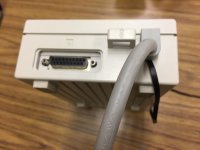
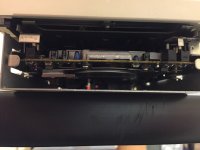
I just got my Applesauce in.  I'll need to do a little surgery to add a sensor for best possible performance.  I'm gonna fiddle with one of my external drives and see if I can mount the sensor while keep the the case on it.

 
Sweet.  I just ran a successful test. :D   Also, make sure to quit and reload the software after a firmware update.  I fiddled with my for several minutes because it kept saying the sync sensor wasn't connected, then it crashed when I tried to run diagnostics.  After reopening the software the interface changed a bit and everything worked great.
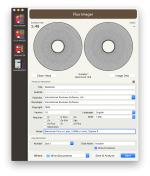
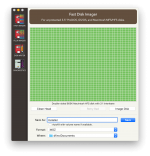
My external drive is a transplanted SuperDrive in an A9M0106 case, so I can verify that the software + sync sensor works just fine on a Sony 2MB drive.  As soon as it's updated to support HD floppies, I'll be good to go.  As you can see from the last picture, the sync sensor fits perfectly inside the case with plenty of room.  The drive is actually elevated off the bottom, so this made it very convenient.  The cable is flat and snakes out the back with the regular data cable.  I think I might file it down just a bit to keep the cable from being pinched, but it does fit without modifications.

I successfully made an .A2R file (raw Flux, it's huge at nearly 24MBs) and a Disk Copy 4.2 image.  Image opened just fine in Disk Copy. :)

I'm looking forward to the .WOZ support for Macintosh disks, as well as high density floppy support.

The disk I used was the installer disk for some software I hadn't imaged yet called DataClub. It's a cross-platform AppleShare client & server administration software for Macintosh and DOS.

Flux.png

FastImage.png

synccable.JPG

sensor.JPG

 
I'm going to try imaging Ultima III when I get home, I know it has copy protection.  Then I'll try writing it back to floppy and see if it works.

 
@olePigeon sweet.  I just got my unit a couple of days ago but haven't installed the sync sensor yet.  I'm going to use it with an Apple II disk II drive as well as a Mac external floppy.  I didn't see explicit instructions for installing the sync sensor on the Mac floppy on the Applesauce website.  Did you just figure it out?

 
Half the Applesauce website doesn't work, unfortunately.  I've emailed them about it, but hasn't been fixed.  I found the "directions" in the form of a picture posted on the Twitters.  I don't have any Disk IIs, only Unidisks, and there aren't any directions for installing the sensor on Unidisks yet (although the official Wiki says it works...)

D42sFuWU0AASCDu.jpg.02b6d2880f4a94ba256b7946cf989f61.jpg


I've had an epiphany about SCSI2SD v6.  I've just created a 32 GB card with a 2, 4, and 23 GB partition on it at a single SCSI ID.  The 2 GB partition is intended to be a boot drive.  The 4GB one is for storing stuff from OS versions < 8.1.  The 23 GB one I've formatted as HFS+, which I can read and write to from Mojave.  So this can be my easy transfer device between modern and vintage systems; I just have to have a bridge device that can boot to 8.1 to copy whatever I need to the 4GB partition that is HFS or another drive.  Or, share it via Appleshare to other macOS systems of that era. 

 
I didn't see explicit instructions for installing the sync sensor on the Mac floppy on the Applesauce website.  Did you just figure it out?
I have to admit I'm scratching my head as to why you'd design a controller that can handle Macintosh floppy drives that requires you to install an index sensor for full functionality.

There's a legitimate reason why adding an index sensor to a Disk ][-style 5 1/4" disk could be considered a necessary step if you really want to create a "perfect" flux image of an Apple II floppy: I assume they want the sensor so they can exactly determine when the disk has completed a full revolution so there's no confusion in where to stitch the samples together into "rings" without having to actually interpret the formatting, and they can't just use a PC floppy drive that *does* have an index sensor because Apple 5 1/4 inch drives with their direct stepper motor control can do half/quarter stepping increments that Shugart interface drives can't. But Apple 3.5" drives can't do partial steps. (IE, Apple reused the stepper motor control lines to create a simple bus that's used to send higher-level commands like "step a track", and there's no command for half a step.) Therefore, technically speaking, there's no barrier to using a standard PC drive to read the flux pattern off a Mac disk. (Plenty of controllers have had that capability in the past, IE, catweasels and such) Yes, the lack of speed control means you'll need to handle a variable bit rate for the incoming data, but that's a solved problem.

I suppose the answer probably is they primarily designed this for Apple II and tacked on Mac drive support as an afterthought. Whatever works.

 
I have to admit I'm scratching my head as to why you'd design a controller that can handle Macintosh floppy drives that requires you to install an index sensor for full functionality.
I know it can be used on the Apple II to help defeat copy protection.  Maybe it serves a similar function on the Macintosh version.  I'll give it a go when I get home.  Test it with Ultima III and MacTerminal, both of which have copy protection.

 
I know it can be used on the Apple II to help defeat copy protection.  Maybe it serves a similar function on the Macintosh version.  I'll give it a go when I get home.  Test it with Ultima III and MacTerminal, both of which have copy protection.
Again, though, if you're interested in flux imaging you'd be able to read the same data with a PC floppy drive.

Technically speaking a controller that wanted to be able to read *any* Macintosh floppy would need to be capable of sampling variable data rates anyway because with the original Mac 128/512k's 400k floppy drive it was indeed possible to control the rotation speed of the drive by replacing the built-in floppy driver with a custom one and changing the PWM signal. Software that leveraged that for copy protection actually comprises a significant chunk of the small collection of software that only works on the "64k ROM" Macs verses the later ones; It's not the ROM, it's that the 800k and later drives ignore the PWM signal and simply rotate at different fixed speeds depending on what track they're on.

 
Last edited by a moderator:
I have to admit I'm scratching my head as to why you'd design a controller that can handle Macintosh floppy drives that requires you to install an index sensor for full functionality.


The index sensor is optional for 3.5", not required.

The Mac 3.5" drive has index sensing, but it was found to be subpar:


That makes me think it is measuring the rotational speed of the devices, as Mac floppies can be variable speed, so that might be necessary to develop a good flux image. 

 
Back
Top