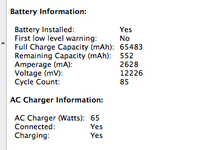
I am sure there is a way to reset the BMS, but probably needs some special software or even hardware.
Having such a large value, I think the BMS probably has encountered integer overflow so its capacity has "rolled over".
Value of 65483 (mAh) is very close to 65536 which is 2^16.
There was a battery firmware update for some PowerBook G4 batteries, which someone could have a peek inside and find a way to reprogram the BMS. I am sure there are lots of people with same problem - I own 5 G4 PowerBooks, and two of them have the same issue.
The battery holds its charge fine, lasts for about 2 hours... so I doubt it is a problem with cells.

 Hello Guest! We're hosting a challenge to welcome vintage Intel macs to the MLA during the month of July! See this thread for more information.